
In development for macOS
The office suite built for the Mac.
Fast spreadsheets and documents that open your Office files, run natively on Apple silicon and stay on your Mac.
There is no beta yet. Write to us and you will hear when one opens.
- 500+
- spreadsheet functions in the formula engine
- 1,090,000
- generated test workbooks opened without a crash
- 23 MB
- on disk for the two apps together
- 0
- subscriptions. One purchase, later updates included
Measured on development builds in October 2026. How we tested
 Vex Sheets
Spreadsheets that keep up with you.
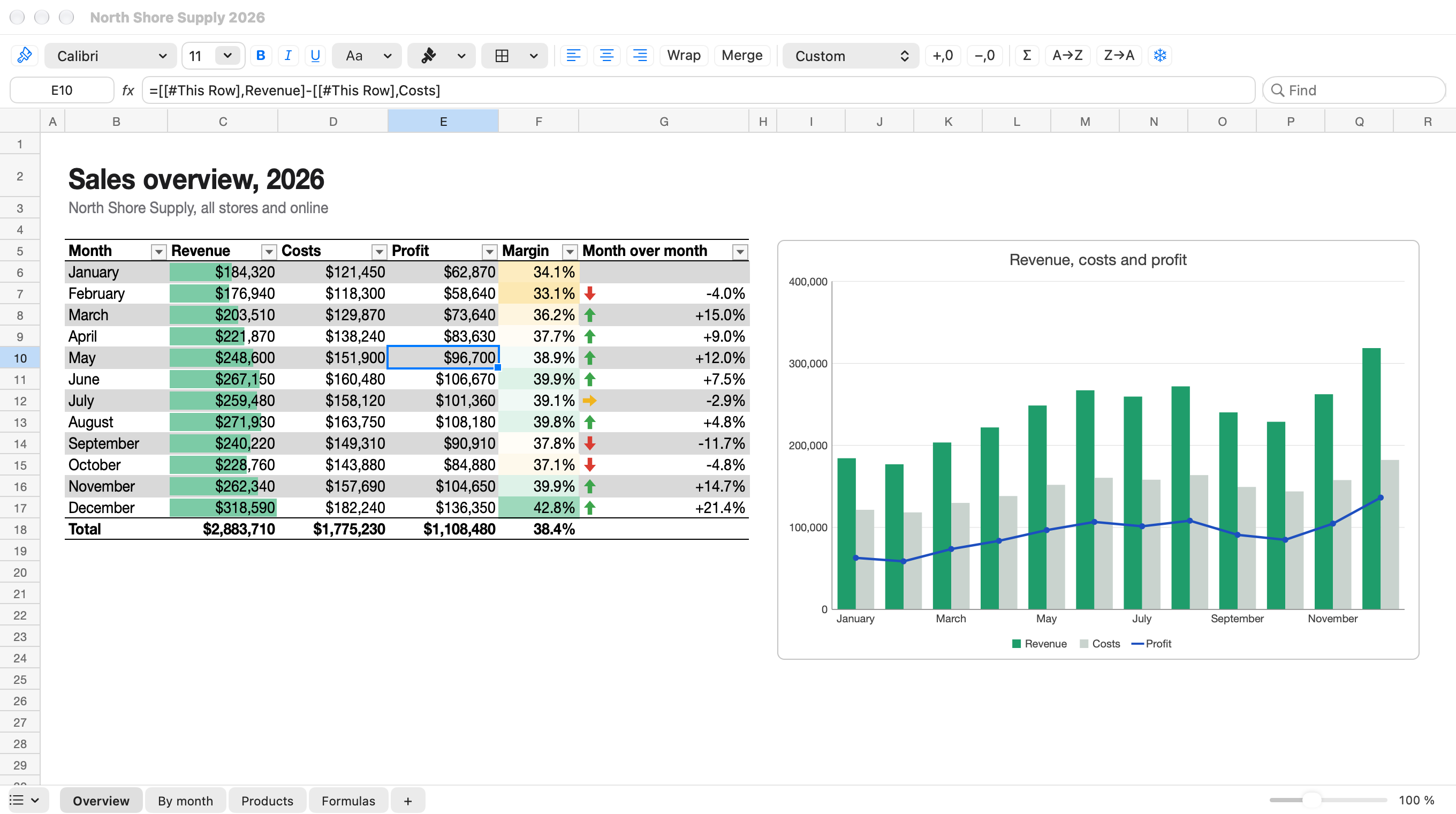
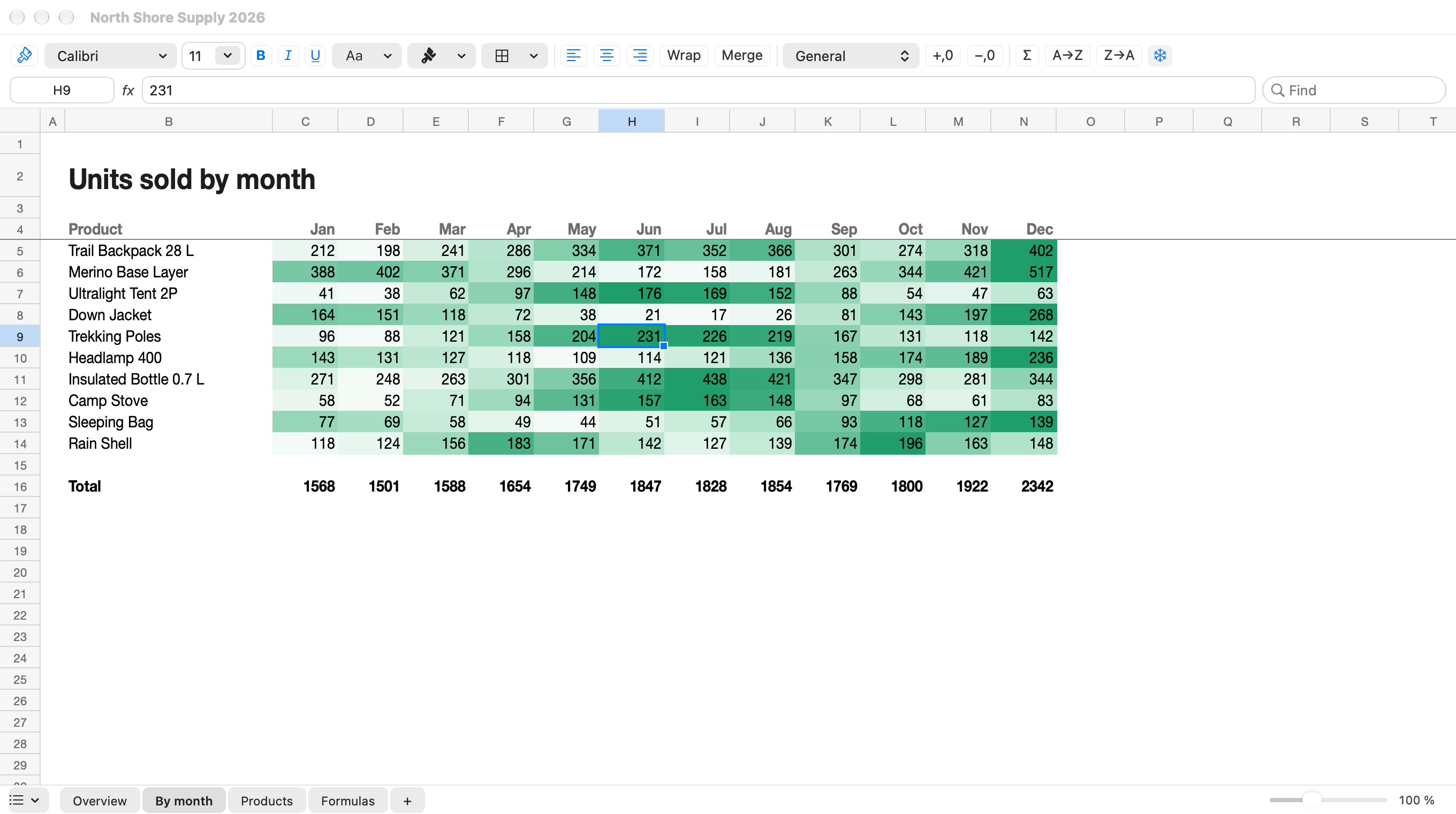
Workbooks with a million formulas open in seconds and scroll smoothly: a frame is drawn in about a millisecond, a fraction of what even a 120 Hz screen allows. An edit recalculates the cells that depend on it and nothing else.
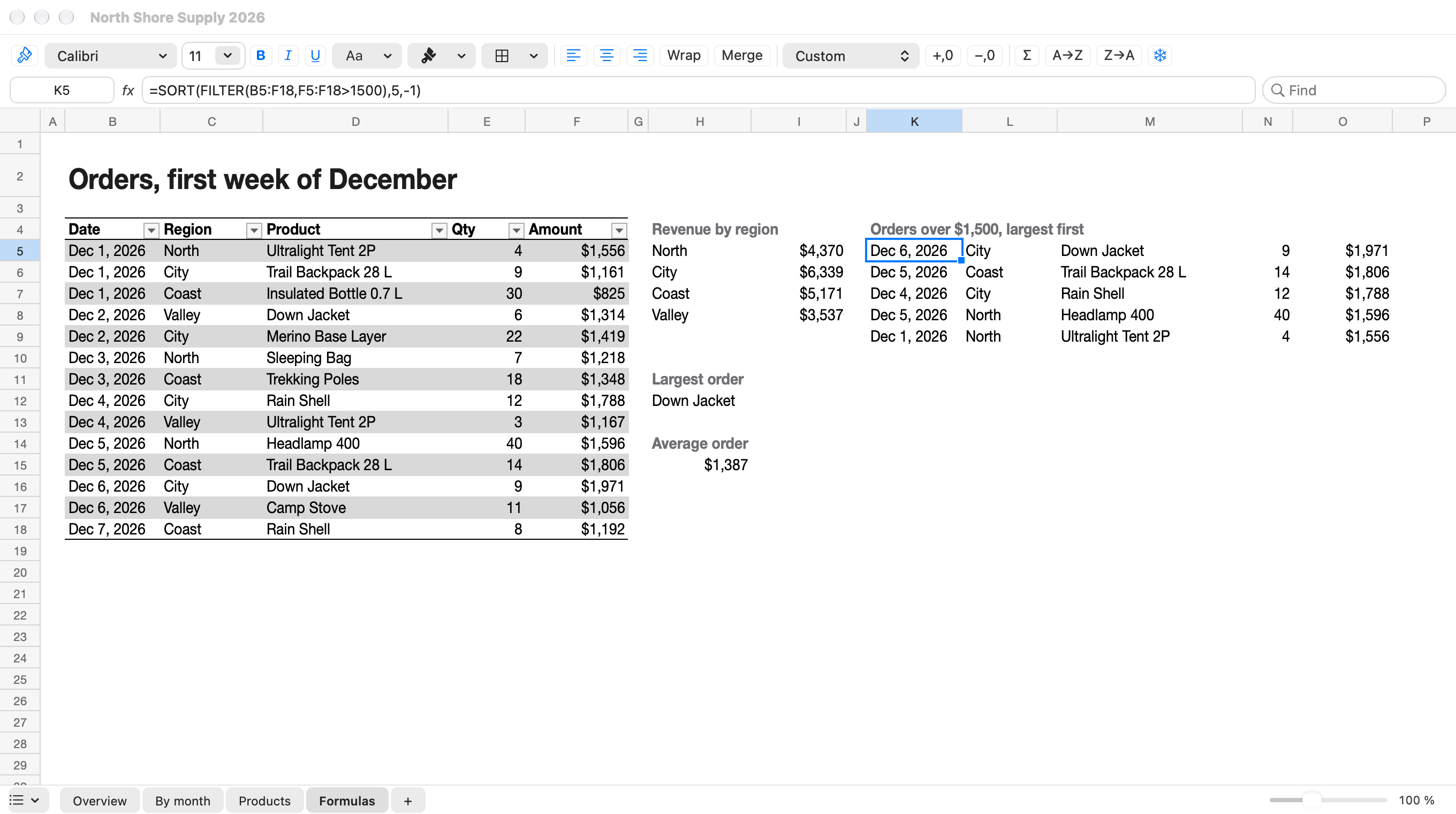
Formulas in your language
Function names, separators and decimals follow the language of the interface. The file keeps the standard form, so it opens the same everywhere.
Only what changed
A dependency graph knows which formulas read which cells. Typing a value recalculates those formulas alone.
Tables and pivot tables
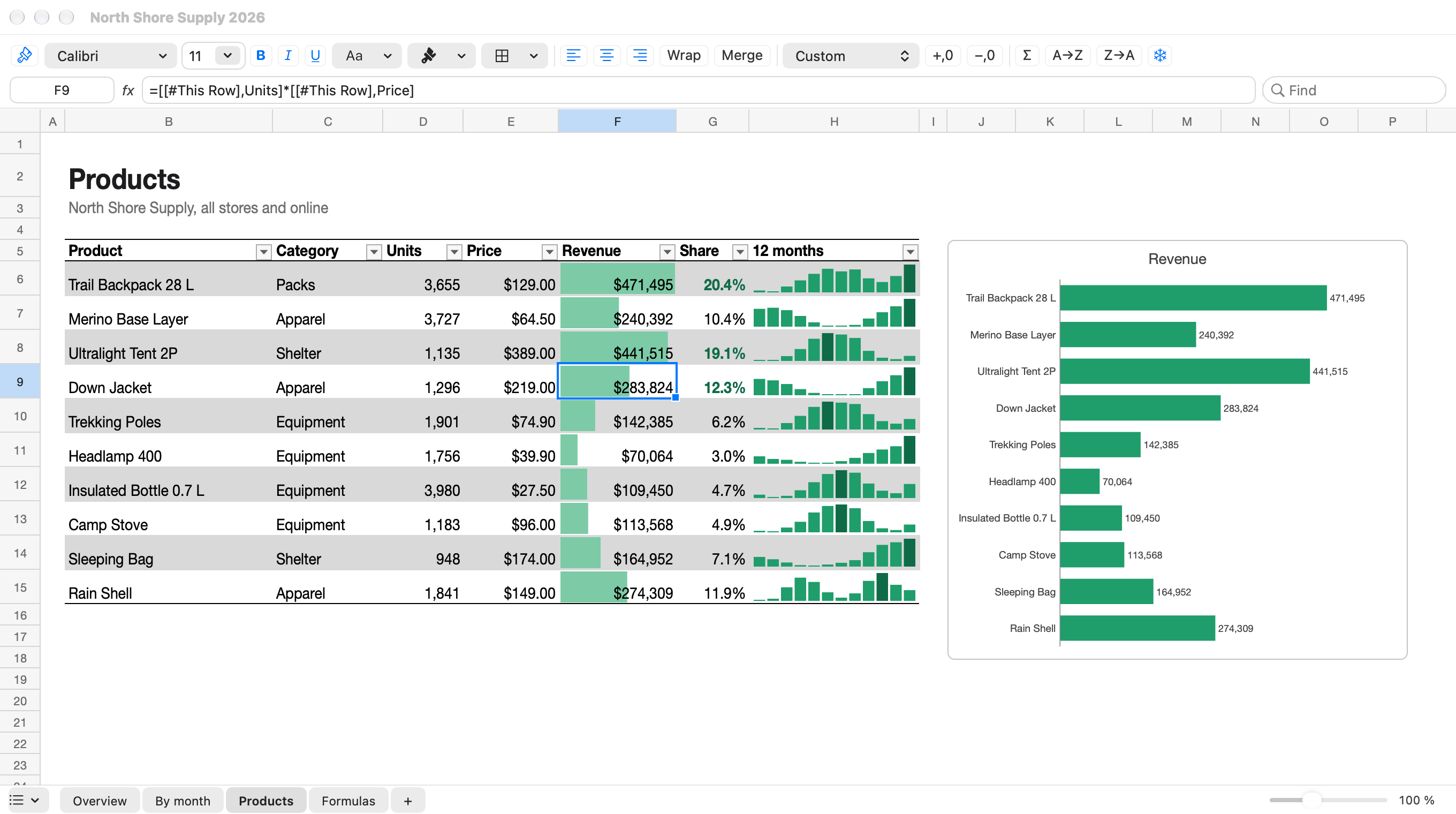
Structured references, totals and all 60 built-in table styles. Pivot tables keep their layout and recalculate from the source data.
Printing as the workbook asks
Print areas, repeated titles, scaling, headers and footers, page break preview and PDF export.
 Vex Writer
Documents that look the way they were written.
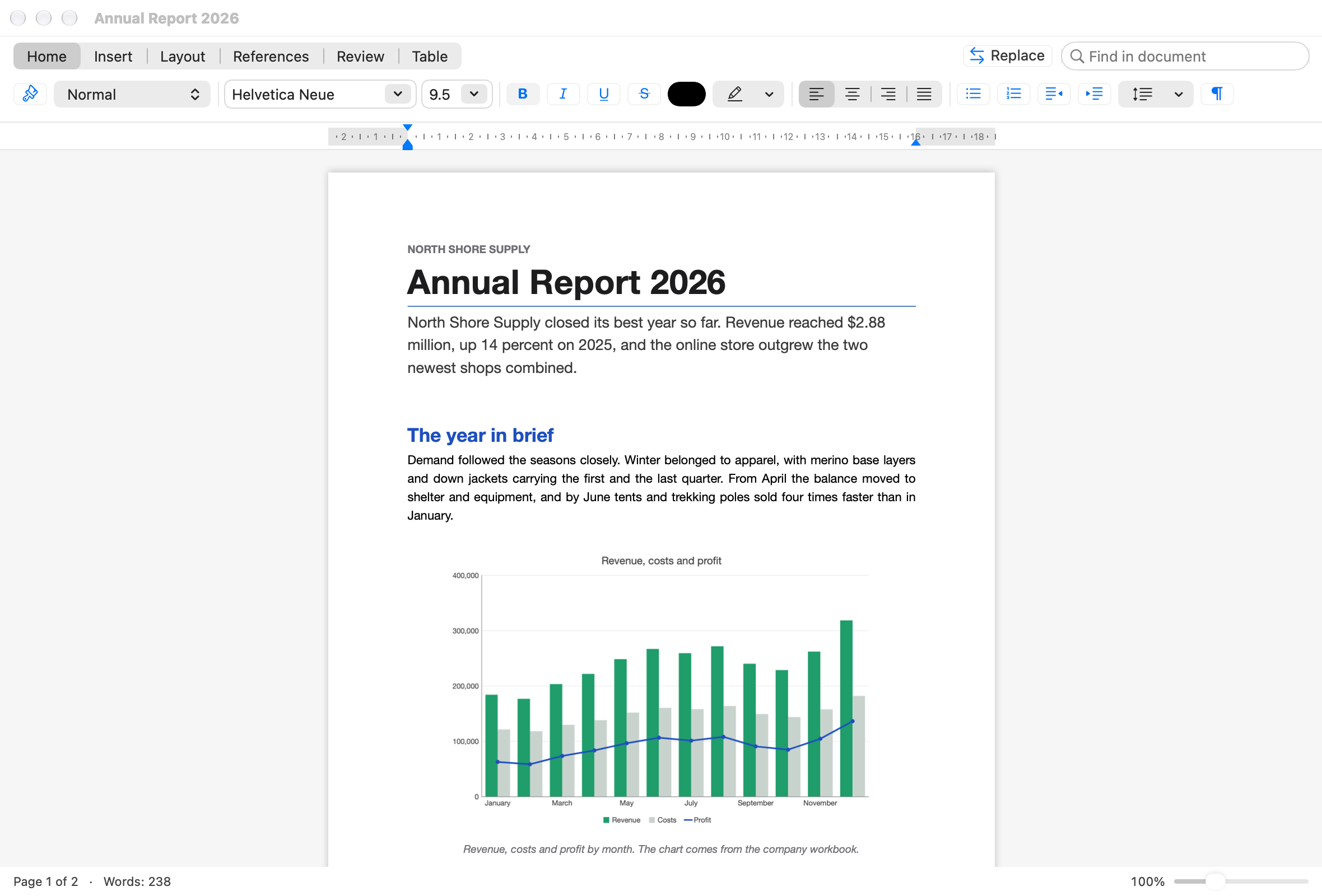
Vex Writer lays out pages with its own engine, and its pages are compared with those of Word itself: in 368 existing documents, 99% of lines end where Word ends them.
- Styles, lists, tables and sections
- Footnotes, table of contents, headers and footers
- Pictures, shapes, charts and equations in the text
- PDF export and printing from the same layout
Your files stay your files.
Reliable exchange with Microsoft Office formats comes first. Open a file, change what you need, save it. Documents saved by Vex Writer have been opened in Word itself; checking saved workbooks in Excel is still under way.
Opens what you already have
Current formats and the binary ones from 1997 to 2003, each read by code written for this suite. No converters, no import step.
 Workbooks
- .xlsx
- .xlsm
- .xls
- .csv
 Documents
- .docx
- .doc
- .rtf
- .odt
- .html
formulas in existing workbooks, recalculated from scratch, gave the result stored in the file.
How we testedWhat it does not show, it keeps
Parts of a file the apps do not edit, such as macro projects, themes, custom XML and extensions, stay in the file as they arrived. Only what you change is rewritten.
One file, two languages
The same formula in an English and in a Russian interface.
=SORT(FILTER(B5:F18,F5:F18>1500),5,-1)=СОРТ(ФИЛЬТР(B5:F18;F5:F18>1500);5;-1)Compared with Word itself
Word for Mac and Vex Writer each turned the same 368 documents into PDF, and the two were compared line by line: every one of them comes out on as many pages as in Word, and 31,916 of 31,951 pages begin with the same line. Every document was also saved by Vex Writer and opened in Word: all 368 open, each on as many pages as the original.
A damaged file should not cost you your work.
Files arrive cut short, half downloaded or written by a script that got something wrong. VexOffice says what is wrong and recovers what can be read.
The test corpus holds workbooks that were cut short, stripped of parts or had their first bytes overwritten. Each one was recognised as damaged and opened in repair mode with what it still held. What a file has lost cannot be brought back.
Across 1,090,000 generated workbooks and thousands of randomly damaged copies of real files, the reader never stopped the app.
Unsaved changes are set aside every minute. After a crash the documents come back as they were.
The original is never overwritten
A repaired file opens as a new document, so the damaged one stays as evidence.
A report, not a shrug
Every problem is listed with the part of the file it was found in and what was done about it.
Native to the Mac. Local by default.
An independent alternative for people who want their documents on their own machine.
Written in Swift
AppKit and Core Text from the first line. No web view, no cross-platform layer, no third-party libraries.
Made for Apple silicon
Built for arm64 and macOS 15 or later. Both apps together take 23 MB on disk.
No account
Open a file and work. There is no VexOffice account to create and nothing to sign in to.
No cloud required
Documents stay where you put them and are never uploaded. The apps go online to check the licence. Reports about failures stay on your Mac unless you switch their sending on.
Where development stands.
VexOffice is an early-stage project. This is what works today and what comes next.
Works today
 Vex Sheets
- Opening, editing and saving .xlsx; reading .xls and .csv
- More than 500 functions, dynamic arrays, structured and 3D references
- Tables, charts in the colours of the workbook, sparklines, conditional formatting, data validation
- Shapes and text boxes with their text and gradient fills
- Pivot tables shown in their style and recalculated
- Cell styles, sheet protection, checkboxes in cells
- Printing, PDF export, repair mode
 Vex Writer
- Opening, editing and saving .docx; importing .doc with its drawings, .rtf, .odt, .html
- Page layout with tables, footnotes, sections and columns, compared with Word itself on 368 documents
- Pictures (EMF and WMF too), shapes, text boxes, charts, equations
- A font missing on the Mac is replaced by one of the same kind
- Printing, PDF export, repair mode
In progress
- Saved workbooks checked in Excel itself, and edited documents in Word
- Page breaks that match Word in every document
- Rebuilding pivot tables, editing charts
- Full tracked changes and comments in Writer
- Release on the Mac App Store
Planned
- Presentations, on the same foundation
Last updated . What's new
Who makes VexOffice.
VexOffice is built by one independent developer.
I am building VexOffice so that working with documents on a Mac does not ask for a compromise between convenience, performance, privacy and freedom of choice.
The project is at an early stage. Both apps already open, edit and save real files; the first public release is still ahead.
Questions and ideas reach the developer directly at [email protected]
Questions
Can I get VexOffice now?
Not yet. The suite is in active development. The release is planned for the Mac App Store, and this page will link to it. There is no beta yet either: write to us and you will hear when one opens.
How much will it cost?
VexOffice will be sold on the Mac App Store as a one-time purchase. It gives you the version you buy for good and every later update, major ones included. There is no subscription. The price will be announced closer to the release.
Will it change my files?
Only when you save. The parts of a file the apps do not edit are kept as they arrived, and a damaged file is never overwritten by its repaired copy. Documents saved by Vex Writer have been opened in Word itself; checking saved workbooks in Excel is still under way.
Do I need an account?
No. There is no VexOffice account. The purchase goes through the Mac App Store, and your documents stay with you.
What do the apps send over the network?
Never your documents. The apps check their licence. A report about a failure is written to a log on your Mac and is sent only if you switch sending on: it is off by default. Usage statistics are optional too, and can be switched off completely.
Which Macs does it run on?
Macs with Apple silicon running macOS 15 or later.
Do macros run?
No. Macro projects are kept inside the file untouched, so they still work when the file returns to Excel or Word, but VexOffice never executes them.
Is it VexOffice or Vex Office?
The same suite. Its name is written as one word, VexOffice, and Vex Office, written apart, means the same thing. It has two apps: Vex Sheets for spreadsheets and Vex Writer for documents.
Is VexOffice related to Microsoft?
No. It is an independent project written from scratch, with its own code, names and design.
Planned for the Mac App Store.
VexOffice is in active development. It will be a one-time purchase with no subscription: the version you buy is yours for good, and later updates are included.
There is no beta yet. Write to us and you will hear when one opens.
Requires macOS 15 or later and a Mac with Apple silicon.
Questions or ideas? Write to [email protected]